Pursuing Excellence in Design and Technology - Raj Lal

Tuesday, April 1, 2014

My article at MSDN magazine on Camera Apps for Lumia 1020


Here is my presentation at Silicon Valley Code Conference which gave me the idea of this article.

Build an Advanced Camera App for Nokia Lumia Phones

Rajesh Lal

Excerpt from the article... http://msdn.microsoft.com/en-us/magazine/dn630649.aspx

In this article, I’m going to teach you how to develop an app for the 41-megapixel (MP) Nokia Lumia 1020 and 20MP Nokia Lumia 1520 smartphones. I’ll focus primarily on the Nokia Lumia 1020, but the information applies to all Lumia Windows Phone 8 devices with PureView technology. First, I’ll discuss PureView, the technology behind the powerful camera included in the phones, and then I’ll explain the advanced features available to access and enhance your photographs. I’ll provide an overview of the Nokia Imaging SDK (it has tons of ready-to-use graphic filters) and a walk-through of how to use it. I’ll also cover the typical workflow needed to build a camera app and show you how to create a tilt-shift photo filter to simulate shallow depth of field. Let’s get started.

Understanding the PureView Technology in a 41MP Camera Phone
PureView technology consists of advanced camera hardware and related software. Together, they allow the capturing and saving of high-quality, high-resolution images. The three main aspects of PureView technology are a high-resolution camera lens, oversampling and lossless zoom. I’ll briefly explain each one.

The core of PureView technology is a high-resolution sensor, 7,728 pixels wide and 5,368 pixels high, totaling more than 41MP. This enables the camera phone to capture big photographs, six times larger than a normal 5MP photograph.

Figure 1 compares a 41MP resolution picture with a 5MP resolution picture. Because of this 41MP resolution, you can take high-quality 34MP 16:9 photographs (7,728 x 4,354) as well as 38MP 4:3 photographs (7,152 x 5,368), as shown in the lens view of the camera in Figure 2.

A 41MP Picture Compared with a 5MP Picture


Figure 1 A 41MP Picture Compared with a 5MP Picture

Lossless Zoom Is Still Part of the Photograph Figure 2 Lossless Zoom Is Still Part of the Photograph

Pixel oversampling is when the camera takes a 41MP photograph and creates a high-quality 5MP image. This is the picture you see on the phone’s screen. Furthermore, the oversampling process keeps all the rich detail in the image but filters away any visual noise.

The third aspect of PureView technology is lossless zoom, which simply means you don’t lose image quality when you zoom. This is possible because—at any point in time—you have available the original 41MP picture, which is oversampled to show a 5MP photo. When you zoom, you’re really zooming into a part of the original 41MP photo. At up to a 3x zoom, you’re still dealing with parts of the original 41MP photo. And even at maximum zoom, your photo quality is still the quality of a regular 5MP photo. Due to oversampling, the picture quality only gets better as you zoom. Figure 2 shows how the lossless zoom is still part of the original photograph.

The Nokia Imaging SDK When building a camera app, a high-resolution photograph is the raw material, but you’ll need an advanced software stack that can use the huge images and let you access and manipulate them. This is where the Nokia Imaging SDK comes into the picture (bit.ly/1hJkmpl). It provides a set of advanced features to access a high-resolution photograph taken by the camera.

The Nokia Imaging SDK includes partial JPEG decoding, called Random Access JPEG (RAJPEG) technology. RAJPEG allows for random access of JPEG data, fast downscaling of images and instant partial decoding. These aspects of RAJPEG enable real-time image manipulation. The Nokia Imaging SDK contains more than 50 filters, effects and enhancements. It even contains a set of the most common image operations, such as crop, resize, rotate and undo, just to name a few. These out-of-the-box features help you create advanced camera/photo-centric applications without worrying about the most common functionalities. To use the Nokia Imaging SDK in your project, follow the instructions on the Nokia Lumia Developer Library page (bit.ly/KzDPNG).

Checkout the complete article here http://msdn.microsoft.com/en-us/magazine/dn630649.aspx

Labels: , ,

Saturday, September 21, 2013

Evolution of User Interface: My Session at Digital Web & Design Innovation Summit SFO 20 Sept 2013 @iRajLal


Do you know about WIMP? The Natural or Organic Interface? Zooming Interface? And what the heck is the Intelligent UI? Where are all these interfaces coming from. What about the Gesture, Haptics, Pen based and touch and even multi touch interfaces?

In this session learn the intriguing story of the Digital Interface. How the digital Interface started from Command line to WIMP Interface to GUI and now became the most debated topic in the design industry, Skeumorphic Design or Modern UI. See how, with the revolution of devices digital interface took turn to Natural, Touch and Organic User Interfaces. See how User Interface has evolved in last twenty years. See how the current trends in touch screens, text to speech and AI are molding the mere fabric of the User Interface and how the user adoption still is the key to a successful User Interface Design. http://theinnovationenterprise.com/summits/digital-design-sanfran-2013#overview

Labels: , ,

Wednesday, May 8, 2013

Designing Killer Apps for Mobile devices

I am giving a session on mobile App design, so meet me at MoDevUX at Mclean, VA MAY 9-11, 2013 8 AM - 5 PM

Update - Video is Here


Update: here are my slides from todays session


http://ux13.gomodev.com


My session
Designing Killer Apps for Mobile devices!

What makes a mobile app standout from the crowd? When we look at a successful App it seems like a "no brainer" but still so many developers struggle to to get the mobile design right. What's the secret ingredient to get the Mobile App design right. In this session go behind the scene of 10 successful Windows Phone app and see why Design is not how it looks but how it works. Learn ten essential tips for designing Mobile Apps, the Right Way.

http://ux13.gomodev.com/modevux-2013-home/conferences/workshops/#/raj-lal

Labels: , ,

Saturday, May 4, 2013

Vorkspace Teaser Trailer Video

We created this video to showcase Vorkspace at Igniters Meetup Check it out.

Labels: , ,

Monday, March 11, 2013

My team at Ignite

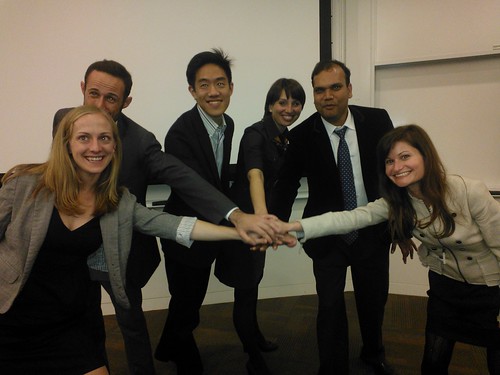
Here is my Team at Stanford Ignite, We did the presentation together.


The final exam at Ignite was this pitch to the VCs. Check the video, I am in the last five minutes.

Moveshare from Raj Lal on Vimeo.


Labels: , ,

Friday, November 2, 2012

HTML5: What's around the Bend

My session at Department of Veteran Affairs on HTML5 finally concluded.
Here are the final slides of the presentation.

Labels: ,

Saturday, October 27, 2012

My Session at JS.Everywhere Conference San Jose Oct 16 2012

Accessible design with html5

How to design an HTML5 website which supports people with disabilities, and know why its a good business decision. The four major disabilities which will be covered, that effect user capabilities are visual, hearing, mobility (difficulty in using the mouse), and cognitive disabilities, which are related to learning abilities. Know how to use the latest technologies to accommodate these users in the user interface. An accessible web application gives maximum reach to your application’s information, functionalities and benefits, by allowing multiple input methods, different interaction models, and customization based on special needs and limited device supports. What People Will Learn - Understand the problem around designing interfaces for people with, disabilities - Know concrete steps to design and develop web applications to, accommodate the four kinds of major disabilities in HTML5 - Know the business case for Accessibility, 4; Learn the standard practices and design guidelines for accessible, design in HTML5

Labels: , ,

Friday, October 19, 2012

Accessibility on Windows Phone - Windows Phone Meetup October 16

My presentation on Windows Phone Meetup at Sunnyvale Nokia Office Learn what accessibility means and how to develop your app and web pages to make it more accessible on mobile devices. An accessible app gives maximum reach to your information, functionality and benefits. The four major disabilities that effect user capabilities are visual, hearing, mobility (difficulty in using the mouse) and cognitive disabilities (which are related to learning abilities). Know how to use the latest HTML5 and Accessible technologies to create for mobile devices.

Labels: , ,

Friday, September 28, 2012

Accessible design - HOW Interactive Design Conference Washington DC SEPT 27-29 2012

My session on Accessible Design at the Capitol ! Learn how to design an interface that supports people with disabilities—and explains why it’s a good business decision. You’ll learn how to use the latest technologies to accommodate disabled users in the user interface, and see how an Accessible Interface gives maximum reach to your application’s information, functionality and benefits by allowing multiple input methods, different interaction models, and customization based on special needs and limited device supports.

Labels: , ,

Wednesday, July 11, 2012

HOW Interactive Design Conference in Washington D.C

Last Year HOW Interactive Design Conference was sold out in 6 SHORT WEEKS

USE SPEAKER Discount code='RAJESH' get $50 OFF


http://www.HOWInteractiveConference.com


My Session

Learn Accessible Design

Description
Join Rajesh Lal as he shows you how to design an interface that supports people with disabilities—and explains why it’s a good business decision.

You’ll learn how to use the latest technologies to accommodate disabled users in the user interface, and see how an Accessible Interface gives maximum reach to your application’s information, functionalities and benefits by allowing multiple input methods, different interaction models, and customization based on special needs and limited device supports.

This is what received in the email today

As a speaker at the upcoming HOW Interactive Design Conference in Washington D.C., I’d like to invite you to join HOW magazine and me from September 27-29 for a conference that is tailor made for designers wanting to expand into the world of digital design.

Broaden your skill set to confidently navigate web, digital, mobile and other forms of interactive media at this 3-day event packed with the information you need to stay on top of today’s fast-paced design evolution.

Plus, I'm pleased to have the opportunity to offer you a special "tell-a-friend" $50 discount on the individual full-conference rate*. Just input RAJESH in the discount code box during the registration process, and HOW will deduct $50 from your total registration. Combine that with the special July 16th Early Bird rate, and you'll save $250!

The HOW Interactive Design Conference program is structured in two tracks – an introductory session and an advanced presentation – allowing you to customize your agenda depending on your experience level. Over the course of the Conference, you’ll be provided with the comprehensive instruction and working tools you need to immerse yourself in this dynamic medium.

For the complete speaker line-up, session descriptions, hotel information, and everything else you need to know about the HOW Interactive Design Conference, including a quick and easy registration form, visit http://www.HOWInteractiveConference.com.

Last year’s HOW Interactive Design Conference sold out in six short weeks! Don’t miss this year’s event – register now! And be sure to use discount code RAJESH to get an additional $50 off the registration price*!

P.S. This special discount code also applies to the West Coast event running October 29-31 in San Francisco.

Labels: ,

Thursday, May 24, 2012

My session on Accessibility at HTMl5DevConf

Accessible Design with HTML5 - HTML5DevConf.com May 21st San Francisco, 2012 details of the session Learn how to design an HTML5 application which supports people with disabilities, and know why its a good business decision. An accessible web application gives maximum reach to your application’s information, functionalities and benefits, by allowing multiple input methods, different interaction models, and customization based on special needs and limited device supports. The four major disabilities that effect user capabilities are visual, hearing, mobility (difficulty in using the mouse), and cognitive disabilities, which are related to learning abilities. Know how to use the latest technologies to accommodate these users in the user interface.

Labels: , ,

My conference at VSLive New York photos and slides

Upgrade Your Website to HTML5 - 15th May 2012 VSLive Conference New York

Learn what you need to do, to upgrade your existing web application with HTML5. How and Where do you start? Learn how you capitalize on the State-of-the-Art HTML5 tags, Cutting edge graphics and animation with CSS3, and advanced HTML5 API and take your existing website to the next level of Web revolution. You will learn: Upgrade your current website with HTML5 Use advanced HTML5 APIs which gracefully degrade Know how to enhance your website with the latest HTML5 goodies

Developing Apps for Nokia Windows Phone VSLiv Conference May 15, 2012

Learn to develop Mobile Apps for Nokia Windows Phone Lumia. See what’s unique about the Nokia Windows Phone also known as the "First Real Windows Phone". Create some snazzy graphics and animation using XAML. The session with Live Demo on Nokia Windows Phone Lumia. You will learn: Windows Phone Development on Nokia Phone Key features of Nokia Windows Phone Lumia See a working demo with advanced graphics Download Source code and downloadable XAP file

Labels: ,

Thursday, November 17, 2011

7 Key HTML5 challenges for N-Screens: My Session at W3C conference

Everything you need to know about developing HTML5 Apps on multiple devices was at W3C conference. I was there in Redmond, Nov 15-16, 2011 this week and it was amazing, first time all the vendors together, instead of talks about individual device/ browsers, all the sessions were focused on the common part, the HTML5 part. If you missed the conference check videos here W3C conference Presentation Videos.

My presentation was about N-Screens Problem, the set of challenges you come across when you develop an App for multiple connected devices. How HTML5 WebApp solution was the most promising solution for the developers. My session was around the 7 Key implementation challenges you will face when developing a Web App solution for multiple devices with different form factors.

The 7 key challenges were, Feature Detection, Layout detection, Using CSS3, Choice of Animation between SVG, Canvas, CSS3 Animation, and WebGL, Audio Video related problems and their work-arounds, and how to use advanced HTML5 API with a brief on Polyfills and Shims.

Here is the online demo of my presentation. Detect your N-device HTML5 features and APIs at http://widgets-gadgets.com/html5. Source code of the demo here


Here is the Video recorded of the session at W3C.

Labels: , , ,

Wednesday, July 27, 2011

Creating a User Interface for a Touchscreen Digital Photoframe

Another of the User Interface idea for digital Touch Screen devices. Got the Patent for this design invention, which I filed at Sony Electronics, San Diego few years ago.


Abstract
---------
A digital picture frame has a frame bounding a touch screen that presents a user interface having first and second arcs of selector elements. The first are of selector elements is manipulable to establish an input genre root, and the second arc is manipulable to select an input branching from a genre root selected using an element in the first group. The arcs are rotatable to reveal previously unpresented selector elements when a person moves a hand along the respective arc.

http://www.google.com/patents/about?id=l_LWAAAAEBAJ

Here are the Slides for the idea.


Let me know what you think !

Labels: , ,

Wednesday, May 25, 2011

My Presentation at the MeeGo Conference SFO 23-25 may 2011

Performance Tips & Tricks for QT/QML Apps: MeeGo Conference San Francisco, Hyatt Regency, May 23-25,2011

Learn the Best practices for QML Application Architecture, Know the Tips and tricks related to show QML in a MeeGo device. Best practices for Qt/QML development and conventions to avoid in QML development. Learn the programming guidelines that apply to QML.

A refreshing list of Tips and Tricks and to optimize your QML applications and know what to avoid.


Here is the Video at Linux Foundation website

Labels: , ,

Thursday, April 14, 2011

Angry Developer: Creating the Game in QML

I was getting a lot of emails about the Angry Developer so decided to blog about just the game with the slides and the code. Let me know if you have suggestions to improve the game.

Download Code here : http://tinyurl.com/AngryDeveloper

Labels: , ,

Presentation at Linux Foundation Embedded Linux Conference

Here is my presentation on QML and JavaScript for MeeGo devices, at Embedded Linux Conference San Francisco 2011.

Description:
Learn to develop News, Social, Tools and Fun & Game Apps using QML and JavaScript on MeeGo devices. Know how to apply some advanced graphics and animations with simple QML and see how JavaScript allows you to create a feature rich application. No C++ required. A tutorial with live demos targeted to beginner to intermediate Mobile developers interested in developing mobile applications on Linux based Mobile Devices.

Labels: , ,

Thursday, April 7, 2011

Build Cutting edge Mobile Apps using QML and JavaScript

My Presentation at Linux Foundation Collaboration Summit Apr7 2011 San Francisco.

Angry Developer Take 2
-------------------------
Learn to create cutting-edge mobile applications using QML and JavaScript on MeeGo devices. Know how to apply some advanced graphics and animations with simple QML and see how JavaScript allows you to create a feature rich application. No C++ required. A tutorial with live demos targeted to beginner to intermediate Mobile developers interested in developing mobile applications on Linux based mobile devices.

Labels: , ,

Sunday, April 3, 2011

My Presentation at Flourish conference

Here is the Video for the Conference ! Link to blip.tv


Fun with QML & JavaScript on MeeGo, at University of Illinois at Chicago for Flourish Conference, Apr 2nd 2011.

Build cutting edge mobile applications using QML and JavaScript on MeeGo devices. Know how to apply some advanced graphics and animations with simple QML and see how JavaScript allows you to create a feature rich application. A tutorial with live demos targeted to beginner to intermediate Mobile developers interested in developing mobile applications on Linux based Mobile Devices. No C++ required.

Download sourcecode for the demo game Angry Developers: http://tinyurl.com/AngryDeveloper

Labels: , ,

Sunday, November 21, 2010

10 Tips for Mobile Website Design

My other presentation at MeeGo Conference Dublin, Ireland (18th Nov.)


Session Summary:
How to create a mobile version of your website? Do you need to optimize your current website for mobile devices or design a completely new website? Do you need to worry about different platforms, Windows Mobile, iPhone, Symbian, Blackberry, Linux, Brew, Android, Nokia and MeeGo? What resolution, what screen size you should target, and what is this PPI anyway? In this session, mobile web usability expert and co-author of Beginning Smartphone Web Development, Rajesh Lal will discuss ten pragmatic tips, for designing website for mobile devices.
Session Abstract:

Ten Tips to design Mobile website for maximum number of users and devices in the least amount of time.

Labels: , ,

Yours Truly


+1-650-224-3812
rajlal[@]live[.]com
@irajlal
Facebook/ irajeshlal

Connect with me


Digital Design Essentials

 
Digital Design Essentials
100 ways to design better desktop, web, and mobile interfaces


Making a difference at W3C

Blog Archives

My New Article

 
Build an Advanced Camera App for Nokia Lumia Phones at MSDN Magazine


MSDN Article on Accessibility

 
Accessible Design with HTML5 at MSDN Magazine


Silverlight VB Book

 
Fun with Silverlight 4 with VB
(Amazon/ Kindle edition)

 
Fun with Silverlight 4 with C#
(Amazon/Kindle edition)

 
Developing Web Widget
(Amazon/Kindle edition)

My Other Books

 
Beginning Smartphone Web Development
(Amazon)


Creating Vista Gadgets with... Silverlight
(Amazon)

My Article at MSDN Magazine

 
Developing 3D Objects

(Fun with Silverlight 4)

Code Project MVP

Codeproject MVP 2008
My Articles at CodeProject

LinkedIn Connect

View Rajesh Lal's profile on LinkedIn

My Twitter Updates

Fun Badge

Free Fun badge


Atom

Association of Computing Machinery